Aircraft Unable to Establish Connection with Mondo Pin / AUSCORS RTK Services

Aircraft Unable to Establish Connection with Mondo Pin / AUSCORS RTK Services
Severity Classification -
Last Updated
Initial Report Date
Current Status
Affected Platform
Issue Overview
Under specific network conditions, the aircraft may experience difficulty establishing a successful RTK connection when using third-party CORS (Continuously Operating Reference Station) correction services, including Mondo Pin and AUSCORS.
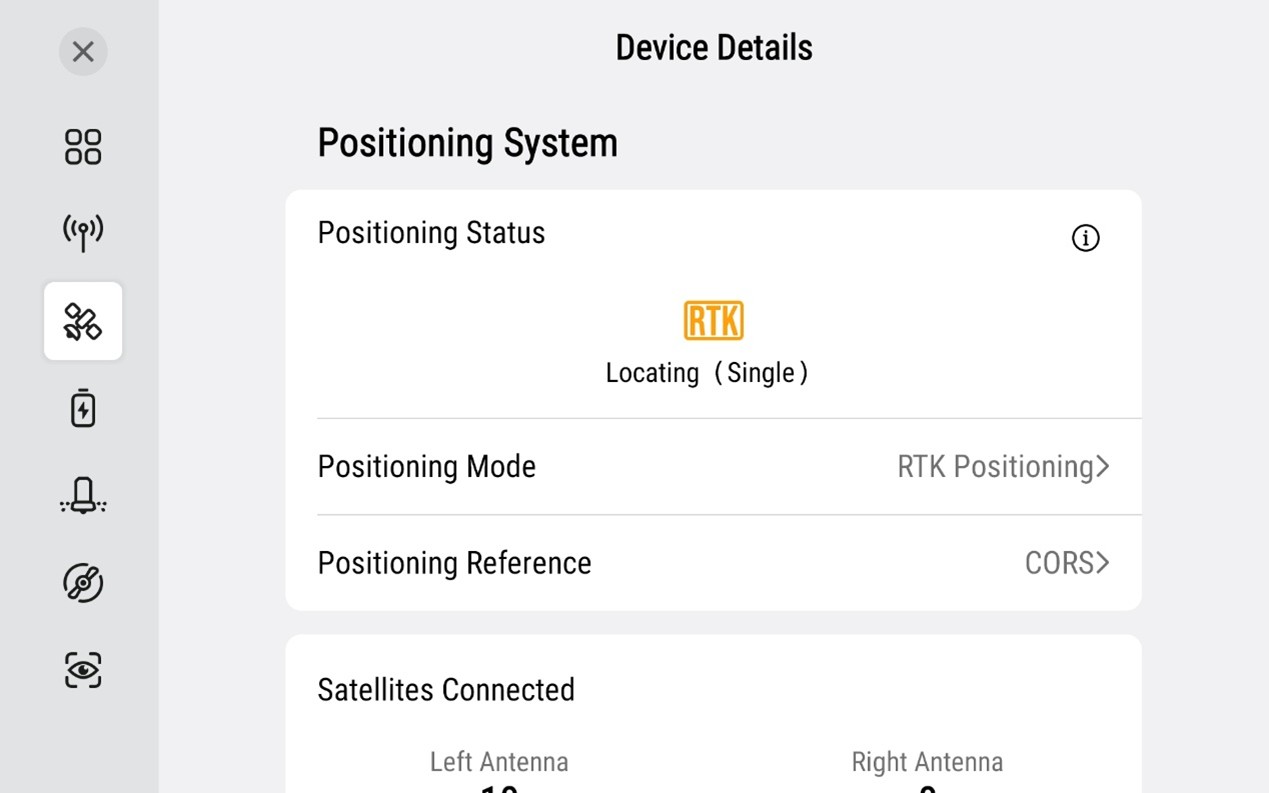
In affected cases, the aircraft positioning status remained at:
! “Locating (Single)”
for an extended period and did not transition to:
x “Active (Fix)”
preventing normal RTK positioning initialisation and autonomous operation.
Preliminary Engineering Analysis
Preliminary investigation identified that the issue was associated with delayed processing during RTK service initialisation and CORS domain communication handling under specific network environments.
Affected connection endpoint identified during investigation:
• rtk.mondopin.com
Further internal testing indicated that communication latency during domain resolution may prevent successful RTK correction stream establishment, causing the aircraft to remain in Single positioning mode instead of achieving RTK Fix status.
Possible Issues Screenshot:
Solution
Central Control Service firmware version 2.1.9.19 has resolved the issue during internal validation testing and is scheduled for official release.
Required Operator Actions
Operators are advised to:
1. Update all aircraft firmware to the latest available version once released,
2. Verify RTK service connectivity before operation,
3. Confirm successful transition from:
- “Locating (Single)”
- to “Active (Fix)”
prior to commencing autonomous operations.
If RTK positioning abnormalities continue to occur:
! suspend autonomous operation immediately,
! and contact XAG Australia After Sales Support for further investigation.
Instructions for Pilots
1. Update aircraft firmware via: XAG One App → Me → Device → P150 Max Device Details → Firmware Update
2. After completing the firmware update, restart both:
- aircraft,
- and remote controller.
3. Confirm that RTK positioning successfully changes to:
- “Active (Fix)”
4. Ensure:
- internet connection is stable,
- selected mount point is online,
- and RTK credentials are correctly configured.
If similar behaviour is observed after theupdate, immediately submit a technical support request via: XAG Australia Repair Request Form
Instructions for Customer
Update the P150 Max aircraft firmware via Firmware Update when it is available.
Further testing confirmed that the Central Control Service firmware beta version 2.1.9.18 has temporarily resolved the issue. If similar behavior is observed, please contact After Sales via support@xag-au.com.
More Posts