

Aircraft Lowering its Approach Height after Take-Off

Aircraft Lowering its Approach Height after Take-Off
Severity Classification -
Last Updated
Initial Report Date
Current Status
Affected Platform
Issue Overview
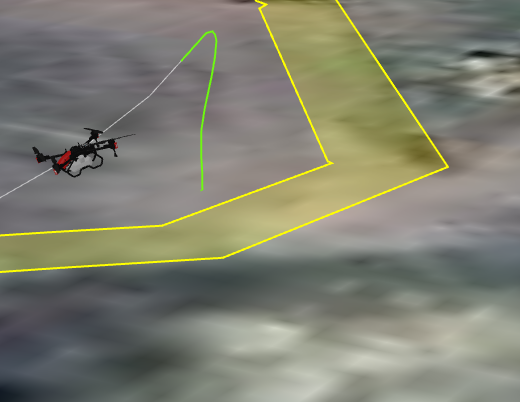
Under specific operating conditions, the aircraft may experience an abnormal decrease in altitude shortly after take-off while following the autonomous approach route.
Preliminary Engineering Analysis
Preliminary engineering analysis indicates that the abnormal altitude behaviour is associated with processing latency within the Navigation Service and delayed synchronisation between the Navigation Service and other onboard firmware modules.
To date, the condition has only been reproduced during execution of the autonomous approach route immediately following take-off. Internal testing has not identified any corresponding impact on the aircraft’s configured operating altitude after it transitions to the operational route within the field.
Further testing indicates that, when processing latency occurs during approach-route execution, the aircraft may temporarily apply an incorrectly calculated approach-altitude setpoint. This may result in an unintended descent before the navigation logic updates the altitude reference and transitions the aircraft to the configured operating-altitude setpoint.
Possible issues screenshot:
Solution
Navigation Service Firmware version 3.0.0.168 has been released to target and mitigate the issue during autonomous operation.
Required Operator Actions
Before commencing autonomous operations, operators must:
- Update all aircraft firmware to the latest available versions, including the Navigation Service.
- Verify that the Navigation Service version is 3.0.0.168.
- Confirm that all other aircraft firmware components are also up to date.
- Complete a low-risk validation flight (Fly - Only Mode with empty tank) and maintain continuous visual observation before resuming normal operations.
Instructions for Operators
- Navigate to XAG One App → Device Page → P150 Max → Firmware Update and complete the firmware update.
- After the firmware has been successfully installed, perform two hard resets:
- Press and hold the battery power button to power off the aircraft.
- Leave the aircraft powered off for approximately 4 minutes.
- Press and hold the battery power button to power the aircraft back on.
- Repeat the above process once more.
- Navigate to XAG One App → Device Page → P150 Max → Firmware Update → Current Version.
- Confirm that the Navigation Service version is listed as 3.0.0.168.
If similar behaviour is observed after the update, manually take over with remote controller and immediately submit a technical support request via: XAG Australia Repair Request Form
More Posts


